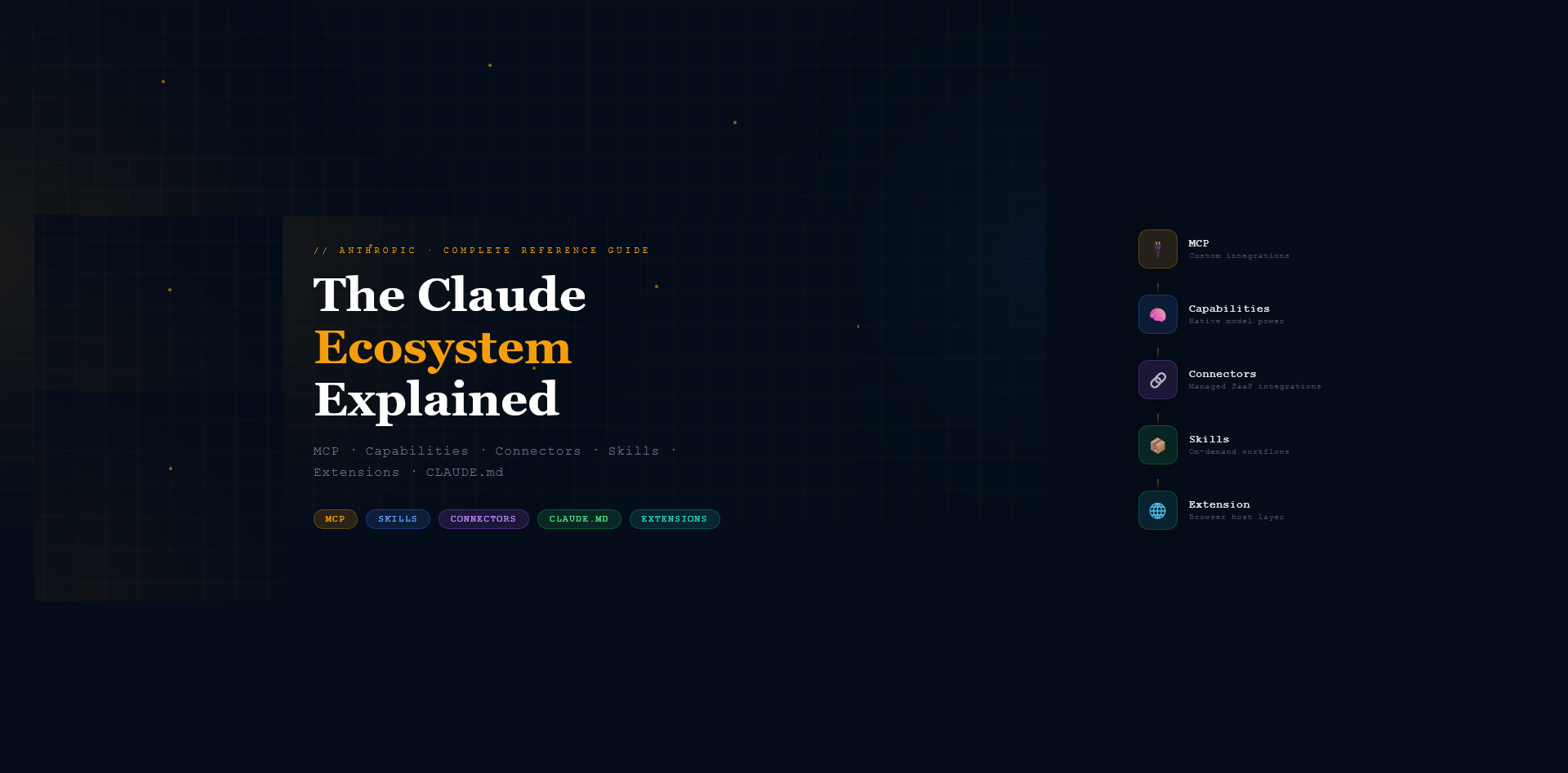
I spent a Friday night going down a Claude rabbit hole and couldn’t find a single resource that mapped the whole ecosystem clearly. So I built one. This is that guide.
Most Claude documentation covers one feature at a time. After configuring Claude across claude.ai, Claude Code, CoWork, and the Chrome Extension, I kept hitting the same problem: terminology overlaps, features behave differently per surface, and no single resource maps it all out.
This guide covers everything — definitions, use cases, and a clear decision framework for which tool belongs where.
60-Second TL;DR
- MCP — developer-built custom tool integrations
- Capabilities — built-in model powers, zero setup
- Connectors — OAuth SaaS integrations (Drive, Jira, GitHub)
- Skills — packaged workflows, works everywhere
- Extension — Claude in your browser
- CLAUDE.md — Claude Code session memory, always loaded
- .claude/rules/ — domain guardrails, always loaded
Rule of thumb: Skills beat CLAUDE.md for workflows. Keep CLAUDE.md under 200 lines.
Part 1 — What Each Term Actually Means
1. MCP — Model Context Protocol
An open protocol that standardizes how external tools and data sources communicate with Claude. Think of it as the USB-C standard for AI integrations — any server that speaks MCP can plug into any MCP-compatible client.
- Layer: Infrastructure / Protocol
- Analogy: USB standard — build once, works with any compatible device
Examples:
- A GitHub MCP server that queries PRs and issues
- A Postgres MCP server that runs read-only SQL queries
- An MCP server that reads your local filesystem
Use MCP when: You’re a developer building custom integrations with your own APIs, databases, or internal systems. You need a reusable integration that works across multiple AI clients (Claude, Cursor, Gemini CLI).
Don’t use MCP when: You’re a non-developer wanting quick integrations (use Connectors instead), or the task is one-off and setup overhead isn’t worth it.
2. Capabilities
Built-in, native abilities Claude has out of the box. No external server, no setup. Baked into the model or the Claude.ai product layer.
- Layer: Model / Product core
Examples: Vision, extended thinking, code execution, document reading, multilingual output
Use when: You want zero-setup power — send an image, ask Claude to analyze code, read a PDF.
Don’t use when: You need real-time external data or the AI to take actions in external systems. Capabilities are model-side and static.
3. Connectors
Pre-built, managed integrations between Claude.ai and specific third-party services. Anthropic or partners manage these — you authenticate once and Claude can read and act on that service’s data.
- Layer: Product integration (Claude.ai only)
- Analogy: Pre-wired electrical outlet — someone already ran the cable, you just plug in
Examples:
- Google Drive — Claude reads and summarizes your docs
- GitHub — Claude reviews PRs, reads issues
- Jira — Claude creates and queries tickets
Use when: You’re a Claude.ai user wanting Claude to interact with SaaS tools without writing code.
Don’t use when: Your service isn’t in the supported list (build MCP instead), or you’re in Claude Code (Code uses MCP, not Connectors).
4. Skills — The Specialist You Call In
Folders of instructions, scripts, and resources that Claude loads on-demand when relevant to the task. The formal Anthropic feature (launched October 2025) for packaging repeatable, specialized workflows.
- Layer: Task orchestration / on-demand context
- Architecture: ~100 tokens to scan metadata, less than 5k tokens when activated
- Analogy: Specialist consultant — sits in the waiting room until relevant
- Lives in:
.claude/skills/(Claude Code) · uploaded as.zip(Claude.ai) ·container.skills(API)
Examples:
pptxskill — creates professional PowerPoint presentationsobsidian-note-processor— generates structured Obsidian vault notespr-review— reviews pull requests against team coding standards
Use when: You have a repeatable multi-step workflow you’d otherwise re-explain in every prompt. You want the workflow portable across Chat, Code, CoWork, and API.
Don’t use when: It’s a simple one-liner (“use camelCase”) — put that in CLAUDE.md. Or it’s a one-off task where the overhead of creating a skill isn’t worth it.
5. Extensions (Claude in Chrome)
A browser extension that embeds Claude directly into Chrome, giving it the ability to perceive and interact with web pages, tabs, and the DOM.
- Layer: Runtime environment / browser host
- Enables:
computer,navigate,find,read_page,form_input,javascript_tool
Use when: You want Claude to see and interact with web pages — browser automation, form filling, navigation, scraping.
Don’t use when: The task doesn’t involve a browser, or you need CLAUDE.md / .claude/ folder support. Extension doesn’t have filesystem context.
6. CLAUDE.md
A Markdown file that Claude Code automatically loads at the start of every session. Claude Code’s persistent memory — instructions that persist across all sessions for a project or globally.
- Layer: Project/user memory (Claude Code only)
- Loaded: Every session, always — regardless of task
- Hierarchy: Enterprise → Project root → User global → Auto-memory
What belongs here:
- Tech stack (“Runtime: Node.js 22, Framework: Next.js 15”)
- Team conventions (“Always use pnpm, never npm”)
- Commands (“Tests: pnpm test, Build: pnpm build”)
- Hard rules (“NEVER commit without running tests”)
What does NOT belong here:
- Long procedural workflows — those are Skills
- Sensitive credentials — this gets committed to git
- Everything — keep it under 200 lines or adherence degrades
7. .claude/rules/
A directory of Markdown files, each containing domain-specific guardrails for Claude Code. Loaded every session alongside CLAUDE.md, but split by concern — keeping CLAUDE.md lean.
- Layer: Project/user memory (Claude Code only)
- Analogy: Department policy document — HR has its rules, Engineering has its rules
Examples:
testing.md— Jest conventions, mock patterns, coverage requirementssecurity.md— Input validation rules, auth patterns, forbidden patternsapi-conventions.md— REST naming, error handling, versioning rules
Part 2 — Comparison Tables
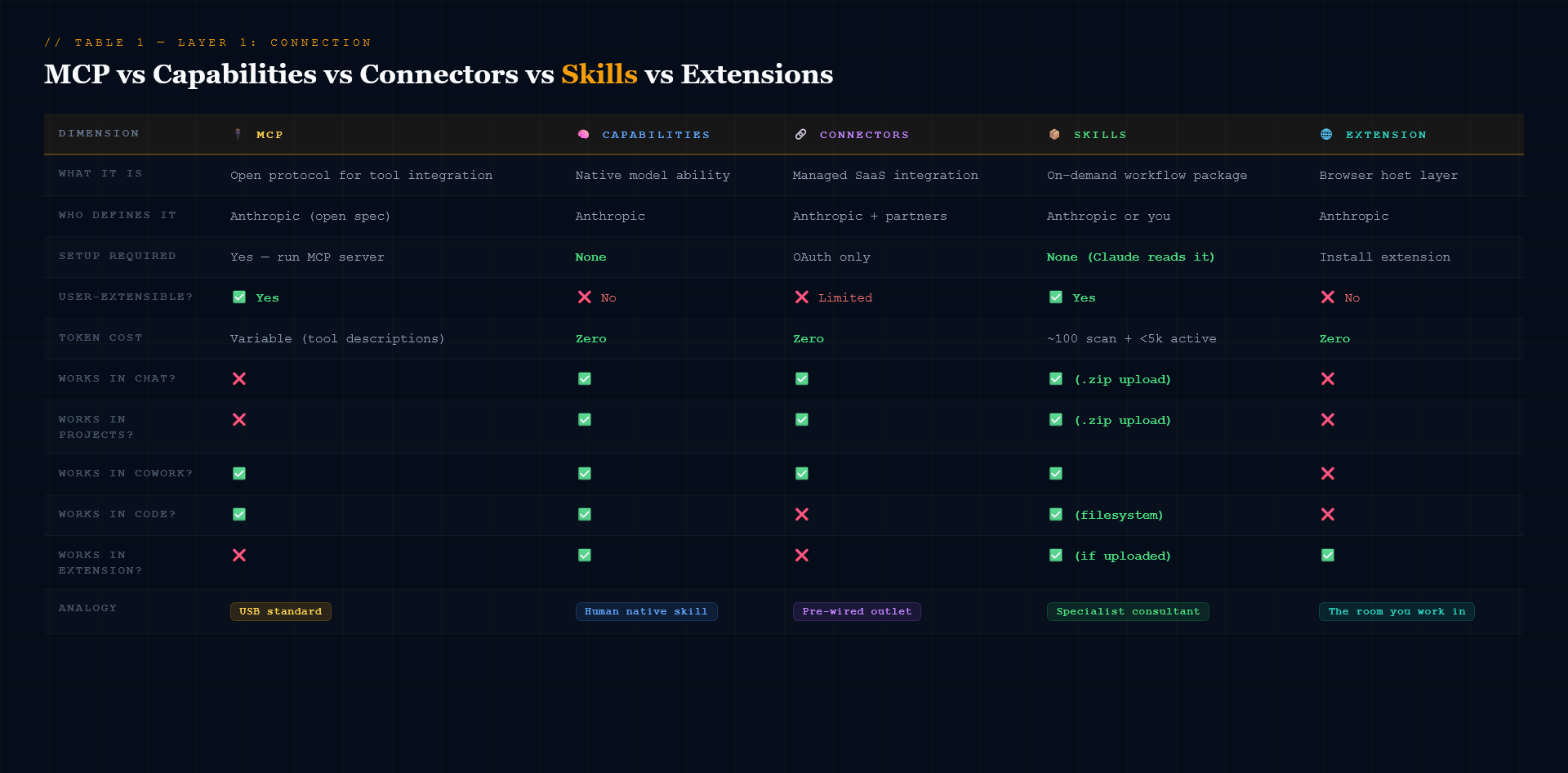 [MCP vs Capabilities vs Connector vs Skills vs Extensions]
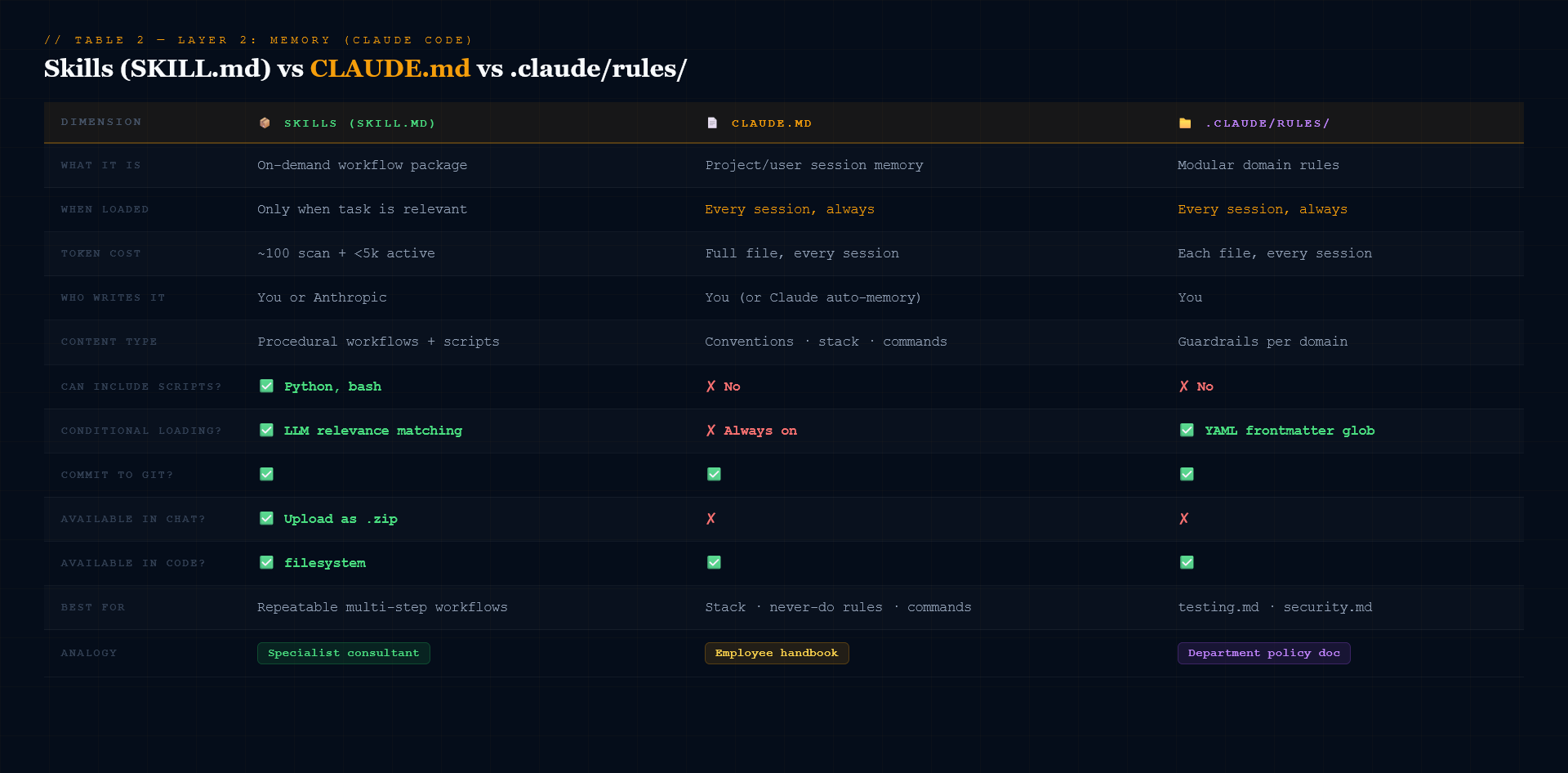 [skills vs Claude.md vs rules]
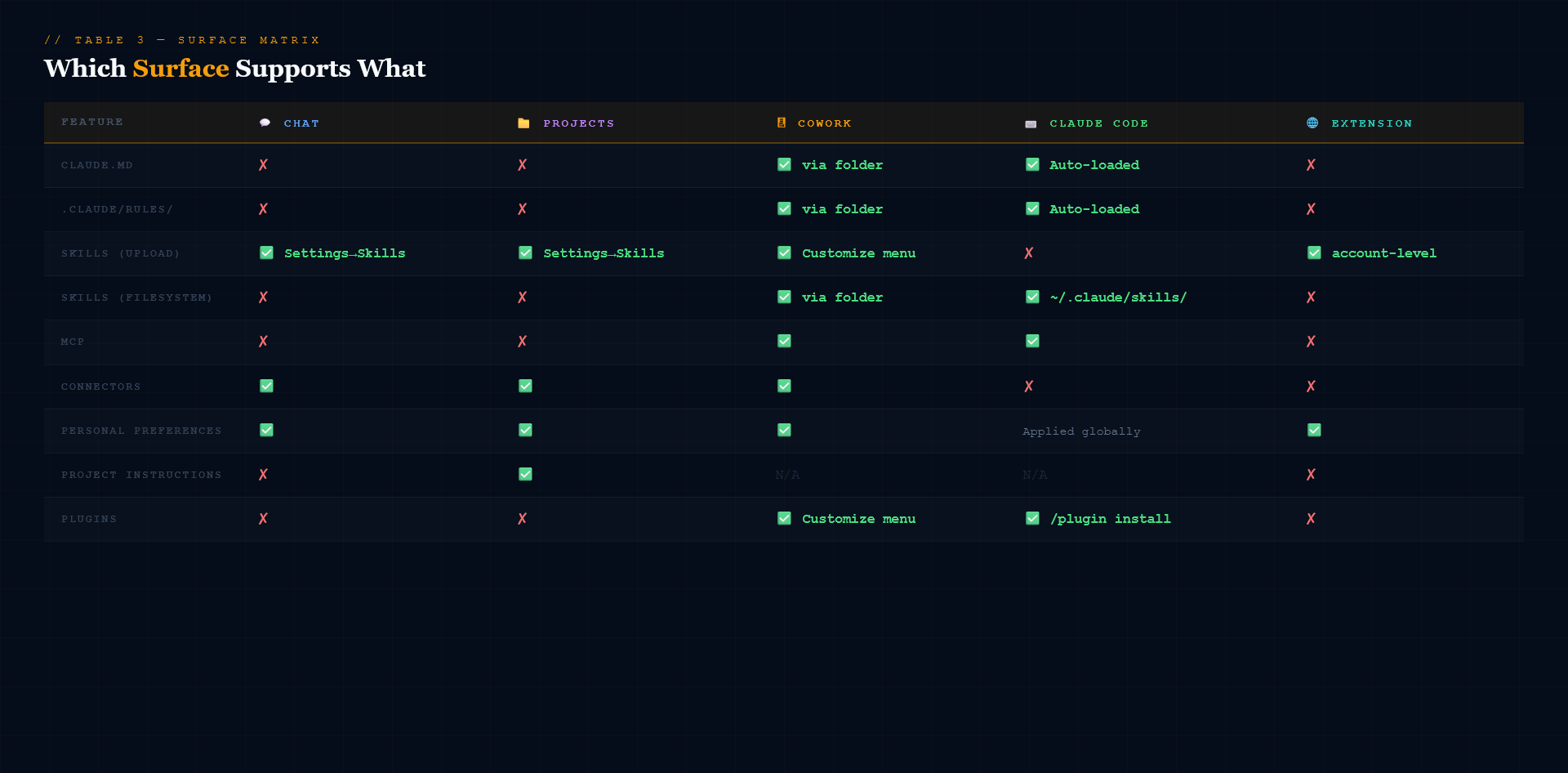 [which surface support what option]
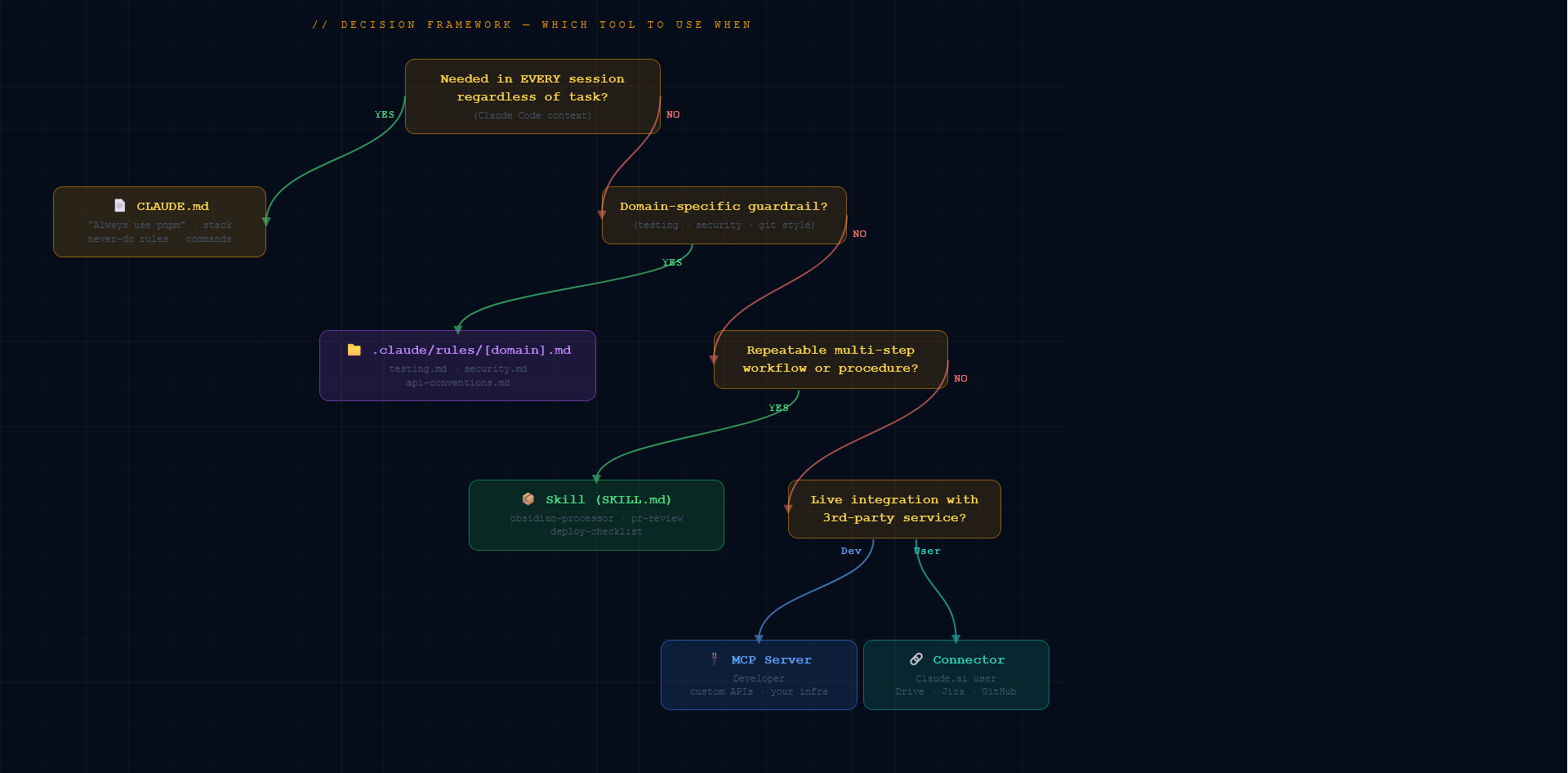
Part 3 — Decision Framework: Which Tool to Use When
 [Decision framework]
Ask yourself these questions in order:
Is this needed in EVERY Claude Code session regardless of task? → YES → CLAUDE.md
Is it a domain-specific guardrail (testing, security, git)? → YES → .claude/rules/[domain].md
Is it a repeatable multi-step workflow or procedure? → YES → Skill (SKILL.md)
Is it a live integration with a third-party service? → Developer → MCP server → Claude.ai user → Connector
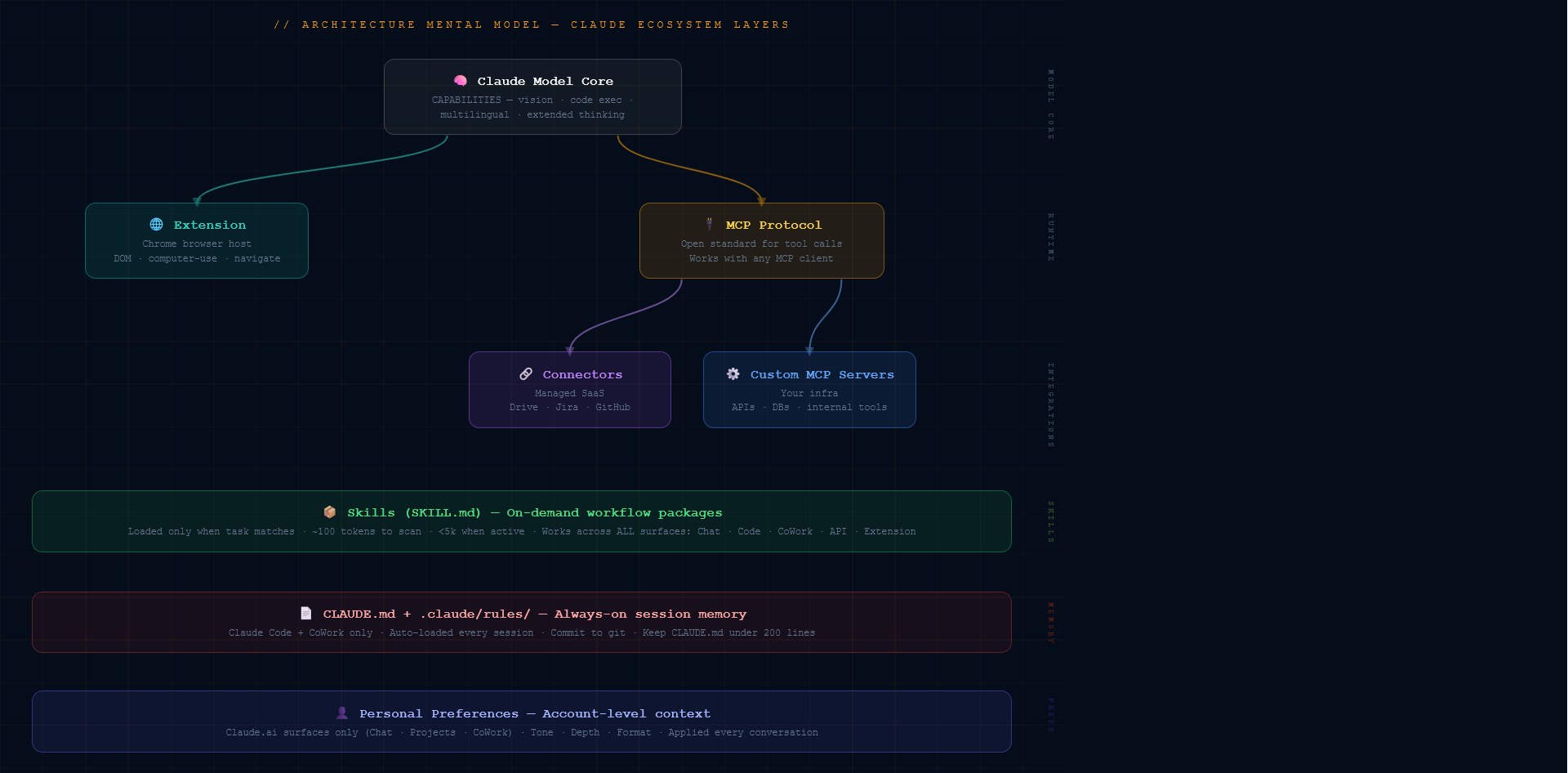
Part 4 — Architecture Mental Model
 [Architectural mental model]
How the layers stack:
- Top: Claude Model Core — everything runs on Capabilities as the foundation.
- Layer 2 (Runtime): Extension branches left (browser host, DOM access). MCP Protocol branches right (open standard for tool calls).
- Layer 3 (Integrations): MCP splits into Connectors (managed SaaS) and Custom MCP Servers (your own infra).
Cross-cutting layers:
- Skills — works across all surfaces, loaded on demand
- CLAUDE.md + .claude/rules/ — always-on memory, Claude Code only, commit to git
- Personal Preferences — always-on, Claude.ai surfaces only
Part 5 — Common Mistakes
These are the exact mistakes I made in order. Your mileage may vary, but probably won’t.
Mistake 1: Putting everything in CLAUDE.md
It’s loaded every session. Community testing and Claude Code GitHub issues consistently show instruction adherence degrades beyond ~200 lines. Split domain rules into .claude/rules/, move workflows into Skills.
Mistake 2: Using Skills for simple conventions
“Always use camelCase” is one line. Don’t build a Skill for it. Skills are for multi-step workflows, not single directives.
Mistake 3: Expecting CLAUDE.md to work in Chat or Projects
CLAUDE.md is Claude Code only. For persistent context in Chat, use Project Instructions. For account-wide context, use Personal Preferences.
Mistake 4: Building a custom MCP server when a Connector already exists
Check claude.com/plugins first. If Drive, GitHub, or Jira already has a Connector, use it. Build MCP only for services that aren’t covered or when you need custom logic.
Mistake 5: Putting credentials in CLAUDE.md
CLAUDE.md is designed to be committed to git. Never put API keys, tokens, or passwords in it. Use environment variables and reference them by name only.
Mistake 6: Ignoring Personal Preferences
Without preferences, Claude starts fresh every conversation. An 80-word preferences block eliminates the need to re-explain your style and expertise level in every chat.
Part 6 — Real Use Case Examples
Use Case 1: Obsidian Knowledge Management (Personal PKM)
- Skill:
obsidian-note-processor— generates main note, Q&A, flashcards, LinkedIn post for any topic - CLAUDE.md (via CoWork): Linking conventions, folder defaults, WikiLink rules
- Personal Preferences: General tone, engineering literacy assumption
- Surface: CoWork (points to vault folder) or Chat (upload Skill as .zip)
Use Case 2: Engineering Team Code Reviews
- CLAUDE.md: Stack (Next.js 15, TypeScript strict, pnpm), commands, never-do rules
- .claude/rules/testing.md: Jest conventions, mock patterns, coverage requirements
- .claude/rules/security.md: Input validation, auth patterns, forbidden patterns
- Skill:
pr-review— structured PR review against team standards - Surface: Claude Code — git-versioned, team-shared
Use Case 3: Content Creation Pipeline
- Skill:
linkedin-post-generator— generates hook-driven posts - Connector: Google Drive — pulls source material directly
- Personal Preferences: Tone (“punchy, direct, no corporate speak”)
- Surface: Chat or Projects
Use Case 4: DevOps Incident Response
- MCP: Internal log search API, metrics dashboard, CI/CD trigger
- CLAUDE.md: Service names, runbook locations, escalation policy
- .claude/rules/safety.md: “Never trigger a rollback without human confirmation”
- Surface: Claude Code with MCP servers configured
Summary: Quick Reference
| Goal | Tool to Use |
|---|---|
| Persistent conventions for every Code session | CLAUDE.md |
| Split conventions by domain without bloating CLAUDE.md | .claude/rules/ |
| Package a repeatable workflow for any surface | Skills (SKILL.md) |
| Connect to SaaS tools without code | Connectors |
| Build a custom tool integration for your own APIs | MCP |
| Claude to interact with web pages | Extension |
| Account-wide tone and behavior across all conversations | Personal Preferences |
| Context specific to one Project in claude.ai | Project Instructions |